


Introduction
CraftGRN is a modular framework for integrating chromatin accessibility profiles from ATAC-seq with matched RNA-seq expression data to infer condition-specific transcription factor binding sites and reconstruct dynamic gene regulatory networks.
CraftGRN helps users:
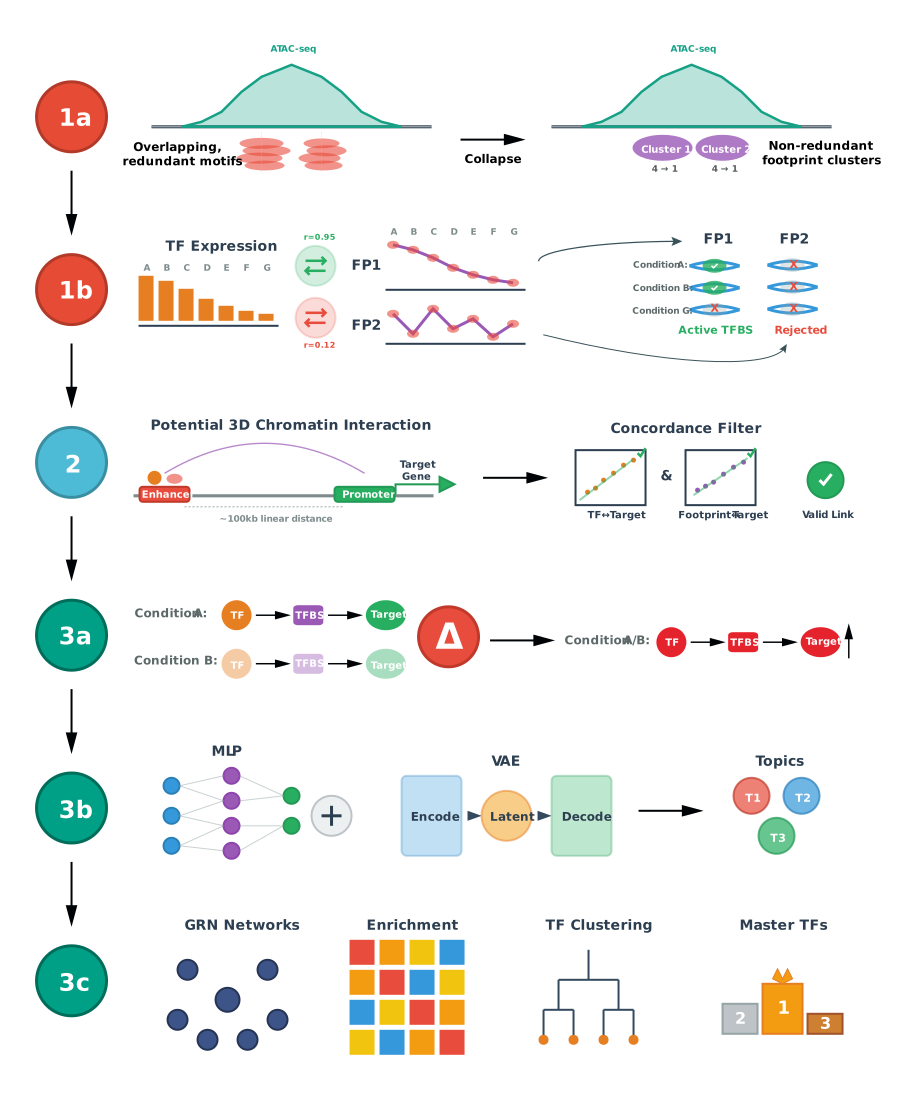
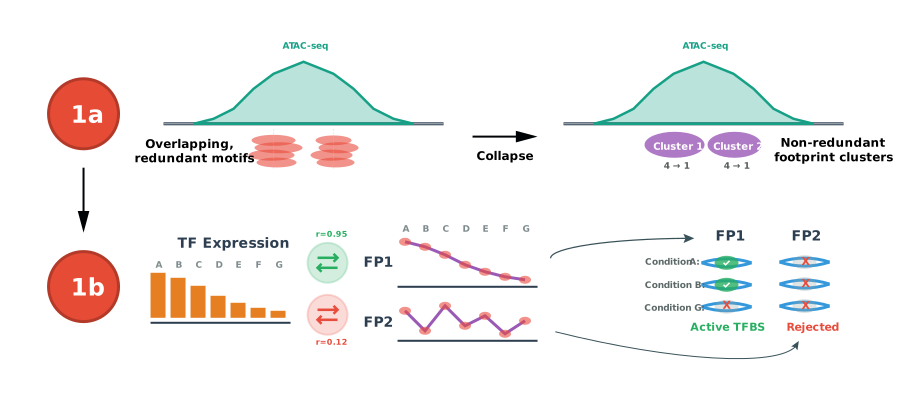
- Collapse overlapping TF motif footprints into consensus, site- and motif-nonredundant footprint clusters.
- Infer condition-specific canonical and non-canonical TF binding sites by correlating TF expression with footprint or chromatin accessibility scores.
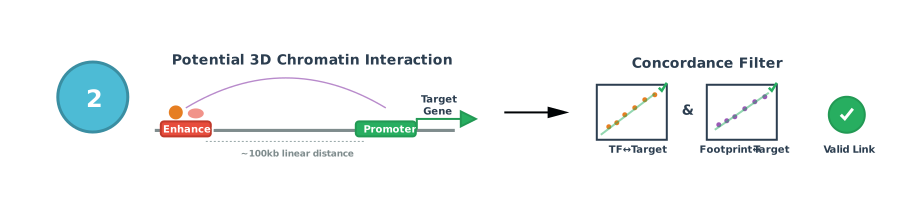
- Refine TF->TFBS->gene regulatory priors using enhancer-gene maps, genomic proximity, or user-supplied chromatin interaction data.
- Extract active regulatory links within each condition and compare links between conditions.
- Learn regulatory topics from RNA and footprint signals using topic modeling and VAE-based representations.
- Generate summaries and visualizations for topic- and condition-specific regulatory programs.
Installation
CraftGRN can be installed from GitHub:
# Using remotes
remotes::install_github("oncologylab/craftgrn")

# or using pak
pak::pak("oncologylab/craftgrn")
Common CRAN and Bioconductor dependencies can be installed with:
install.packages(c("igraph", "ggplot2", "data.table", "BiocManager"))
BiocManager::install(c("DESeq2", "GenomicRanges", "SummarizedExperiment"))
Demo Data
CraftGRN keeps demo datasets outside the source package so installation remains small and CRAN-friendly. The package helper reports any configured external demo bundles:
craftgrn::craftgrn_demo_data_info()No external demo bundle is currently configured. To run your own project, point CraftGRN at a project-level YAML file:
config <- "project.yaml"
module1_dir <- file.path(tempdir(), "predict_tf_binding_sites")

omics <- craftgrn::load_prep_multiomic_data(
  config = config,
  label_col = "strict_match_rna",
  do_preprocess = FALSE,
  verbose = TRUE
)

module1 <- craftgrn::predict_tfbs(
  omics_data = omics,
  out_dir = module1_dir,
  output_format = "auto",
  write_outputs = TRUE,
  write_stats = FALSE,
  verbose = TRUE
)
Troubleshooting:
- If
craftgrn_demo_data_info()returns zero rows, no public demo bundle is currently advertised by this package version. - If paths fail after moving a project folder, keep
project.yamlin the project directory and pass that config path explicitly. A portable project config should usebase_dir: ".". - If memory is limited, start with
load_prep_multiomic_data()and Module 1 before running Module 2.
Pipeline Overview
CraftGRN is organized as a three-module workflow.
Module 1: Predict TF Binding Sites
Module 1 loads matched ATAC, RNA, metadata, and optional footprint score files, then prepares a multiomic data object for downstream regulatory analysis.
Primary package functions:
-
load_prep_multiomic_data()loads, filters, aligns, and prepares multiomic inputs from a YAML configuration file. When outputs are enabled, it also writes01_fp_scores_qn_<db>.csv, the quantile-normalized footprint score matrix used downstream. -
predict_tfbs()performs direct-bound footprint filtering and TF binding site prediction across matched conditions. -
build_module1_qc_report()writes an HTML QC report for run parameters, input gates, canonical support, correlation diagnostics, predicted TFBS chunk integrity, top TFs/FPs, condition support, warning checks, and related Module 1 artifacts. The report uses multiple static plot types, including processing funnels, density curves, scatter summaries, heatmaps, lollipop rank plots, and cumulative curves.
Module 2: Connect TFs to Target Genes
Module 2 links TF binding sites to candidate target genes using enhancer-gene maps, genomic distance windows, or 3D chromatin interaction priors. Candidate TF->TFBS->target links are filtered by condition-specific expression, binding, footprint or peak signal, and cross-condition correlation evidence.
Primary package functions:
-
predict_tf_targets()predicts TF target genes from predicted TFBS, TF-target correlations, FP-target correlations, genomic proximity, and optional regulatory priors. -
build_module2_qc_report()writes a compact HTML review with Module 1-style navigation and tabs for handoff checks, per-condition QC, TF-target and FP-target evidence, candidate source and distance-to-TSS evidence, final-link integrity, and top TF and target-gene summaries. Detailed values, manifests, warnings, and related reports remain available in a technical appendix.
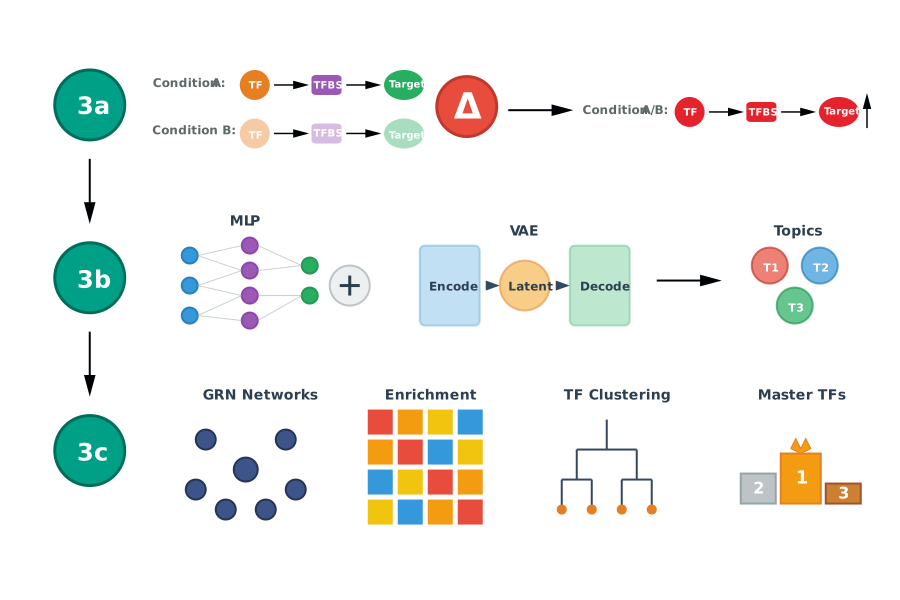
Module 3: Learn Regulatory Topics and Visualize Differential GRNs
Module 3 compares condition-specific regulatory links, builds joint RNA and footprint document-term matrices, trains topic models, assigns regulatory links to topics, and summarizes pathway and master TF programs.
Primary package functions:
-
run_topic_modeling()runs one selected Module 3 topic-document method with a flat standard output layout, compact topic-link outputs, and a QC report. The selected method, K value or K grid, WarpLDA iterations, and topic-link output mode can be stored in the project YAML config. -
module3_prepare_differential_links()prepares filtered differential links from Module 2 predicted links and condition comparisons. -
module3_construct_docs()builds reusable topic-document, document-term, and sparse matrix caches for step-by-step inspection. -
module3_train_topic_models()trains regulatory topic models across a user-defined topic-number grid using the nativewarp_ompWarpLDA sampler by default. Usewarplda_sampler = "warp_ref"only when you need a slower sequential fixed-seed reference run from the native backend. -
module3_extract_topics()assigns topic terms fromphi, TF-topic membership from raw documenttheta, and regulatory links with the recommendedtheta_and_termsinterpretation: the TF document and target gene/peak terms must support the same topic. -
build_module3_qc_report()summarizes topic inputs, model outputs, differential links, and top differential TFs. -
visualize_topic_modeling_results()exports topic-modeling review browsers, andvisualize_differential_grns()exports an interactive differential GRN network browser with comparison, direction, Top TF, and Top link controls.
For regular package runs, keep one selected Module 3 setup in project.yaml, for example:
topic_method: comparison_aggr_multivi
topic_k: 10
warplda_iterations: 2000
topic_link_output: pass
topic_term_assignment_method: gammafit_maxprob
topic_gammafit_thrP:
  lda: 0.70
  multivi: 0.50
pathway_backend: enrichly
pathway_species: human_mouse_best

topic_benchmark_enabled: false
topic_benchmark_methods: []
topic_benchmark_k_grid: []
Module 3 uses different evidence for different topic-assignment units:
- Aggregate Gene and Peak terms are assigned in two stages. The default
normtop_specificityscore and GammaFit cutoffs identify candidate topics;gammafit_maxprobindependently chooses the maximum-phipassing topic forGENE:<gene>andPEAK:<gene>, then keeps both only when those topics agree. Default GammaFit probabilities are model-specific; one scalar can override all models. - TFs are assigned from raw document-topic
theta; a TF document belongs to a topic whentheta >= topic_tf_membership_cutoffand primary-topic ambiguity is controlled bytopic_tf_primary_margin_cutoff. - Genes are summarized from the topic terms observed in theta-selected documents. For per-comparison pathway analysis, a comparison/direction/topic gene set is the intersect of genes observed in documents with
theta >= topic_tf_membership_cutoffand genes represented by the topic’s assignedGENE:<gene>and aggregatePEAK:<gene>terms. - Physical TF-peak-gene links are not used to define pathway topic membership at extraction time. They can be projected later onto selected comparison/topic/pathway genes for subnetworks.
pathway_backend: enrichly uses local cached pathway libraries when the optional enrichly package is installed; pathway_backend: enrichr keeps the web API backend. Set pathway_species: human, pathway_species: mouse, or pathway_species: human_mouse_best to choose pathway database behavior; if omitted, Module 3 infers the species from ref_genome when possible. Benchmark grids are optional and should be enabled only for method-comparison experiments.
For cross-species projects or mouse data where human pathway libraries remain biologically useful, set pathway_species: human_mouse_best. Module 3 runs the human and mouse pathway database sets separately, writes the full audit table, and reports one best row per topic and normalized pathway name. The selected row is ranked by adjusted p-value, then logp, combined score, and overlap size, while retaining the selected species and database columns.
Pathway gene matching uses formal species-specific gene-symbol resolution when the relevant Bioconductor organism package is installed: org.Hs.eg.db for human and org.Mm.eg.db for mouse. CraftGRN resolves official symbols, case-insensitive symbols, aliases, ENSEMBL IDs, and ENTREZ IDs before comparing pathway inputs and returned overlap genes. If no formal match is available, it keeps a deterministic case-normalized fallback so old all-uppercase versus titlecase differences still match where possible.
Standard extraction folders are flat. For a selected K, review the K root for topic_terms.csv, topic_gene_peak_assignment.csv, topic_term_assignment_summary.csv, topic_links_pass.csv, topic_item_coverage_counts.csv, topic_terms_and_cutoffs_summary.pdf, topic_term_phi_score_heatmap_K*.pdf, topic_pathway_enrichment_dotplot.pdf, and per_comparison_topic_pathway_enrichment.csv. Standard runs do not create LDAvis, doc-topic heatmap, raw-theta document heatmap, topic pathway heatmap, standalone topic-term score heatmap, nested TF assignment, nested term assignment, or nested per-comparison pathway folders.
Get Started
For a module-by-module tutorial, see the Get started article.